
Azure DevOps has no built-in validation for variable group references. It happily accepts any $(myVariable) syntax and only tells you something is wrong when the job actually runs. By then, you’ve wasted minutes (or hours) waiting for the pipeline to reach that step.
I wanted to shift this validation left. Way left. Before the PR itself.
The Problem with Variable References
Consider a typical pipeline YAML
variables:  - group: my-app-secrets  - name: buildConfiguration    value: Release
stages:  - stage: Build    jobs:      - job: BuildJob        steps:          - script: |              echo "Building $(buildConfiguration)"              echo "Using connection string: $(connectionString)"              echo "API key: $(apiKey)"
The buildConfiguration variable is defined inline. But connectionString and apiKey? They’re supposed to come from the my-app-secrets variable group. If that group doesn’t exist, or if someone renamed connectionString to dbConnectionString, you won’t know until the pipeline runs.
Enter azdolint
I built a CLI tool in Rust with the help of Ralph.
 Dariusz Parys
The Tool validates your pipeline YAML against your actual Azure DevOps variable library.
The tool is called azdolint and it’s available on crates.io
cargo install azdolintHow It Works
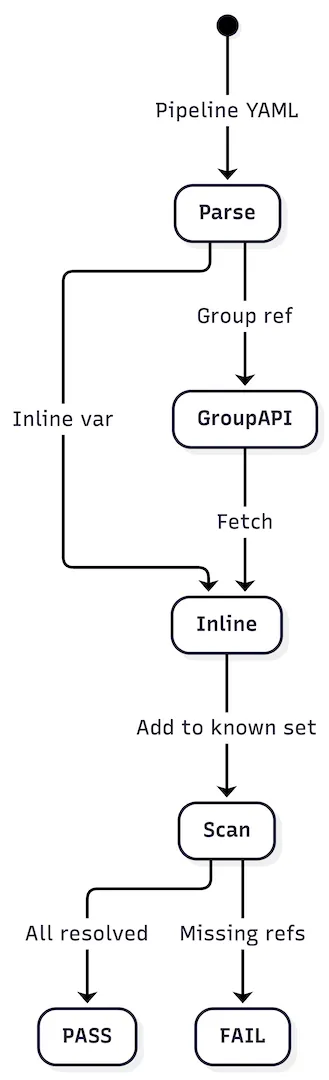
The linter parses your YAML, identifies all variable sources (inline definitions and group references), queries the Azure DevOps API to fetch actual variable group contents, and then scans for any $(variable) references that can’t be resolved.
Prerequisites
The tool requires the Azure CLI with the Azure DevOps extension:
# Install the Azure DevOps extensionaz extension add --name azure-devops
# Login to Azureaz login
# Optionally set your default organizationaz devops configure --defaults organization=https://dev.azure.com/YOUR_ORG
Basic Usage
Point it at your pipeline YAML and specify your Azure DevOps organization and project:
azdolint --pipeline-file ./azure-pipelines.yml \ --organization myorg \ --project myprojectSample output
When everything validates:
Azure DevOps Pipeline Validator================================
Variable Groups---------------  [PASS] Variable group 'ProductionSecrets' exists  [PASS] Variable group 'DatabaseConfig' exists
Variable References-------------------  [PASS] Variable 'ConnectionString' found in group 'DatabaseConfig'  [PASS] Variable 'ApiKey' found in group 'ProductionSecrets'
================================RESULT: PASSEDAll 4 check(s) passed successfully.================================
When something’s wrong:
Azure DevOps Pipeline Validator================================
Variable Groups---------------  [PASS] Variable group 'ProductionSecrets' exists  [FAIL] Variable group 'MissingGroup' not found         Suggestion: Create the variable group in Azure DevOps at:         https://dev.azure.com/myorg/myproject/_library?itemType=VariableGroups
Variable References-------------------  [PASS] Variable 'ApiKey' found in group 'ProductionSecrets'  [FAIL] Variable 'UndefinedVar' not found in any referenced group         Suggestion: Add this variable to one of the referenced variable groups,         or verify the variable name is spelled correctly.
================================RESULT: FAILED2 of 4 check(s) failed.================================
The suggestions with direct Azure DevOps URLs make it easy to jump straight to the fix.
Fine Tuning Edge Cases
The linter base created was a good starting point. But it didn’t work for some pipelines in my active project. So I finetuned the linter and threw all pipeline edge cases at it, updated the corresponding parsing method and now this is a pretty solid linter. The following pieces will be handled
Variable Groups
variables: - group: "MyVariableGroup"Inline Variables
Both list and map formats work:
# List formatvariables:  - name: BuildConfiguration    value: 'Release'
# Map formatvariables:  BuildConfiguration: 'Release'
Template Conditionals
Complex conditional includes are parsed correctly:
variables: - ${{ if eq(parameters.environment, 'prod') }}: - group: "ProductionSecrets" - ${{ else }}: - group: "DevelopmentSecrets"Multi-Scope Support
Variables can be defined at different scopes: top-level, stage, or job. The linter tracks scope inheritance correctly:
variables:  - group: global-vars
stages:  - stage: Dev    variables:      - group: dev-vars    jobs:      - job: Deploy        variables:          - name: localVar            value: something        steps:          - script: |              echo $(globalVar)   # From global-vars              echo $(devVar)      # From dev-vars              echo $(localVar)    # From job scope
Each reference is validated against the variables available in its scope.
Template Files
Template files are automatically detected. When you run the linter directly against a template, it shows a warning and skips validation since templates depend on their parent pipeline context for variable resolution.
CI/CD Integration
Beside having the linter run locally on your machine, you can also use it easily in your CI to catch anything before the PR is merged
trigger: nonepr:  branches:    include:      - main
jobs:  - job: ValidatePipeline    pool:      vmImage: ubuntu-latest    steps:      - script: |          cargo install azdolint          azdolint --pipeline-file azure-pipelines.yml \            --organization $(System.CollectionUri) \            --project $(System.TeamProject)        displayName: "Validate Pipeline Variables"
Not Perfect, But Good Enough
Variable Group Permissions
The Azure CLI identity running the linter needs read access to the variable groups. If you’re validating against production variable groups from a PR pipeline, make sure the service connection has appropriate permissions.
System Variables
The linter is ignoring system variables. This could be an enhancement to also check mistyping of those. But I didn’t go this route yet.
Template Conditionals
This adds complexity. As the linter needs to traverse all branches. I still think there might be cases where this fails.
Curious? Want to Contribute?
The source is on
 GitHubdariuszparys
Hope this helps.